Traceability
How to post traceability scans
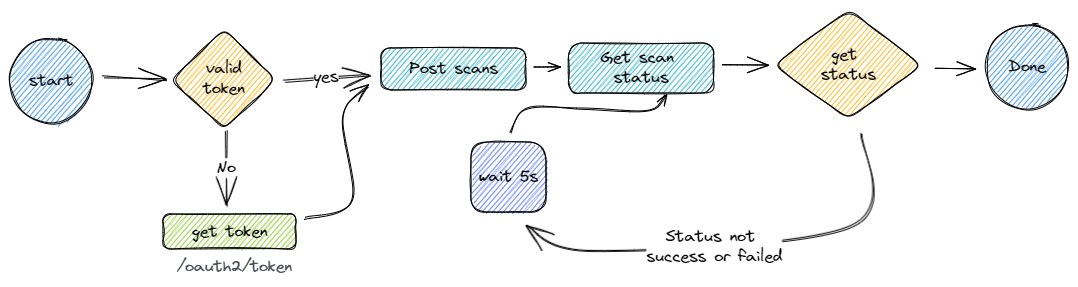
We follow an asynchronous approach to submitting scans. For regular-sized batches (under 5.8 MiB), you can submit directly to the /scans endpoint. For larger batches, you can either use SFTP or obtain a pre-signed S3 URL.
| Url | Description |
|---|---|
| /api/prove/v3/scans | Upload a batch of scan data to be processed by the system. It responds with a unique ID with which a scan status request can be sent. The maximum request size is 5.8 MiB. |
| /api/prove/v3/scans/preSignedUrl | Get a pre-signed S3 URL for uploading large batches of scan data. The URL is valid for 30 minutes and can only be used once. No authentication is required when uploading to this URL. After uploading to the pre-signed URL, use the scansStatus endpoint to check processing status. |
| /api/prove/v3/scans/{requestId}/status | Shows the status of a previously uploaded batch of scans which came from the API call above or via SFTP. Valid states are Received, InProgress, Success, Failed, HasFailures and NotFound |
Upload Process Examples
Direct Upload
For small batches, you can directly upload to the /scans endpoint:
- POST your scan data to
/api/prove/v3/scans
POST /api/prove/v3/scans
Authorization: Bearer <your-token>
Content-Type: application/json

[
  {
    "reference": "DM1NCM-GGNNL2J32J0TQV8U5BF2",
    "timeStamp": "2025-01-05T17:48:59",
    // ... rest of scan data
  }
]
- You'll receive a requestId in response:
{
  "requestId": "1223680852"
}
- Check the status using the requestId:
GET /api/prove/v3/scans/1223680852/status
Authorization: Bearer <your-token>
Large Upload (≥ 5.8 MiB)
For larger batches, use the pre-signed URL flow:
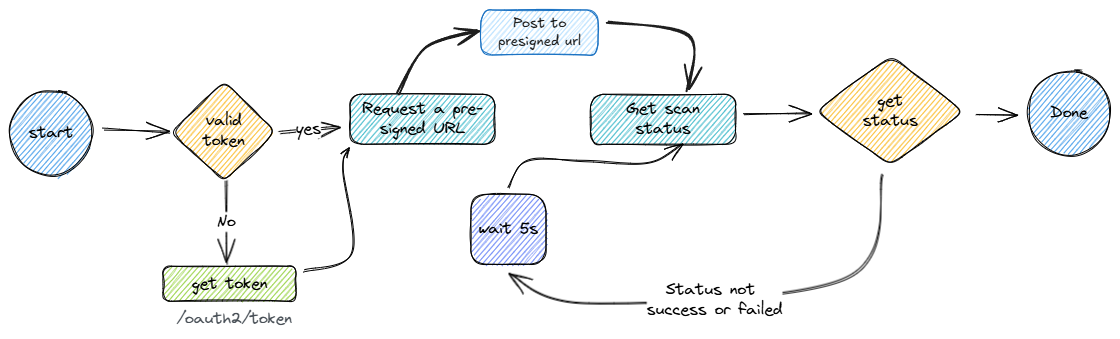
1 Request a pre-signed URL:
POST /api/prove/v3/scans/preSignedUrl
Authorization: Bearer <your-token>
2 You'll receive a response with the URL and requestId:
{
  "url": "https://s3.amazonaws.com/bucket-name/...",
  "requestId": "1223680853"
}
3 Upload your data to the pre-signed URL:
PUT <pre-signed-url>
Content-Type: application/json

[
  {
    "reference": "DM1NCM-GGNNL2J32J0TQV8U5BF2",
    "timeStamp": "2025-01-05T17:48:59",
    // ... rest of scan data
  }
]
Note
No Authorization header is required for this step, as the URL is pre-signed.
Warning
Do not reuse the pre-signed URL. It is valid for 30 minutes and can only be used once. Without a new pre-signed URL and requestId, there would be no way to check the status of the upload or a way to ensure that data is processed. So just to be clear Do not reuse the pre-signed URL!
4 Check the processing status using the requestId:
GET /api/prove/v3/scans/1223680853/status
Authorization: Bearer <your-token>
The status endpoint will return one of these states:
- Received: Upload successful, waiting to be processed
- InProgress: Currently being processed
- Success: All scans processed successfully
- Failed: Processing failed
- HasFailures: Some scans failed to process
- NotFound: Request ID not found
For success:
{
  "state": "Success",
  "requestId": 1223680852,
  "description": "desc",
  "processed": 2
}
For failure:
{
  "state": "Failed",
  "requestId": 1163423360,
  "description": "Failed to process one or more scans",
  "processed": 2,
  "failed": 1,
  "failures": [
    {
      "reference": "123333",
      "reason": "Invalid DCP"
    }
  ]
}
Scan responses and statuses via kafka
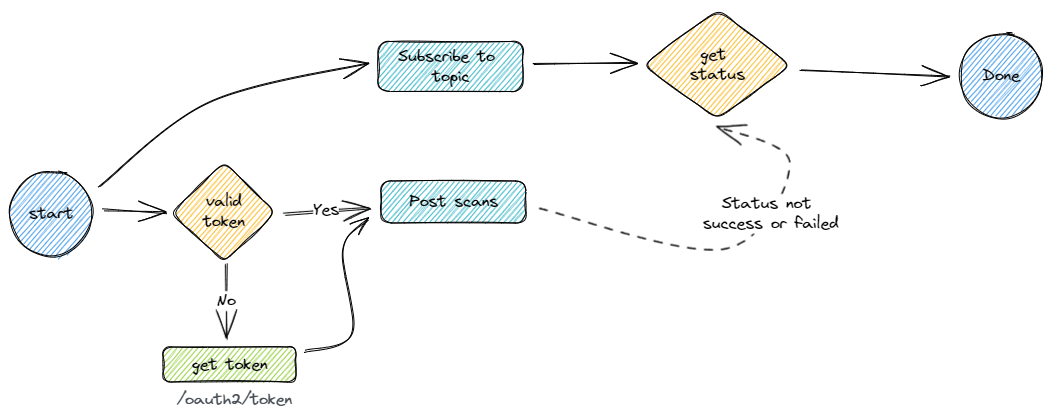
We also provide a kafka topic for real-time updates on the status of the scans. Use the following details to connect to the kafka server:
bootstrap.servers: b-1-public.devcluster.bda6m0.c5.kafka.eu-central-1.amazonaws.com:9196,b-2-public.devcluster.bda6m0.c5.kafka.eu-central-1.amazonaws.com:9196 (prod-server to be supplied)
security.protocol: sasl_ssl
sasl.mechanism: SCRAM-SHA-512
sasl.username: {client_id}
sasl.password: {client_secret}
The topic is {env}-{client_internal_name}-status-event eg uat-circulor-integration-status-event.
The message will be in the following format which is similar to the response of the /api/prove/v3/scans/{requestId}/status call.
For success
{
  "state": "Success",
  "requestId": 1223680852,
  "description": "desc",
  "processed": 2
}
For failure:
{
  "state": "Failed",
  "requestId": 1163423360,
  "description": "Failed to process one or more scans",
  "processed": 2,
  "failed": 1,
  "failures": [
    {
      "reference": "123333",
      "reason": "Failed to read attributes"
    }
  ]
}
Scans request sample
Goods In
Scan point: DM1CEL_1001000
ProductModelKey: pmk_ncm_precursor_bag
Supplier: CRF_GSVRQRAPNC
[{
    "reference": "DM1NCM-GGNNL2J32J0TQV8U5BF2",
    "timeStamp": "2025-01-05T17:48:59",
    "dcpKey": "DM1CEL_1001000",
    "productModelKey": "pmk_ncm_precursor_bag",
    "supplierKey": "CRF_GSVRQRAPNC",
    "parents": [],
    "attributes": [
      { "key": "Cobalt Content", "value": "3.452"},
      { "key": "Weight (kg)", "value": "400.116"}
    ]
}]
Start of Process
Scan point: DM1CEL_1002000
ProductModelKey: pmk_ncm_precursor_bag
[{
    "reference": "DM1CEL-IN68LBEM4VXUCXZHPD5X",
    "timeStamp": "2025-01-09T03:20:39",
    "dcpKey": "DM1CEL_1002000",
    "productModelKey": "pmk_ncm_precursor_bag",
    "parents": [
      "DM1NCM-GGNNL2J32J0TQV8U5BF2"
    ],
    "attributes": [
      { "key": "Cobalt Content", "value": "3.452" },
      { "key": "Weight (kg)", "value": "400.116" }
    ]
}]
End of Process
Scan point: DM1CEL_1003000
ProductModelKey: pmk_stacked_cell_batch
[{
    "reference": "DM1CEL-G6IYL1P5OW5782H0953H",
    "timeStamp": "2025-01-12T17:04:19",
    "dcpKey": "DM1CEL_1003000",
    "productModelKey": "pmk_stacked_cell_batch",
    "parents": [
      "DM1CEL-IN68LBEM4VXUCXZHPD5X"
    ],
    "attributes": [
      { "key": "ProcessCounter", "value": "56556" }
    ]
}]
Goods Out
Scan point: DM1CEL_1003000
Client key: CRF_ZTSXUEKTAP
[{
  "reference": "DM1CEL-G6IYL1P5OW5782H0953H",
  "timeStamp": "2025-01-13T17:04:19",
  "dcpKey": "DM1CEL_1004000",
  "productModelKey": "pmk_stacked_cell_batch",
  "clientKey": "CRF_ZTSXUEKTAP",
  "parents": [],
  "attributes": [
    { "key": "Weight (kg)", "value": "250" }
  ]
}]